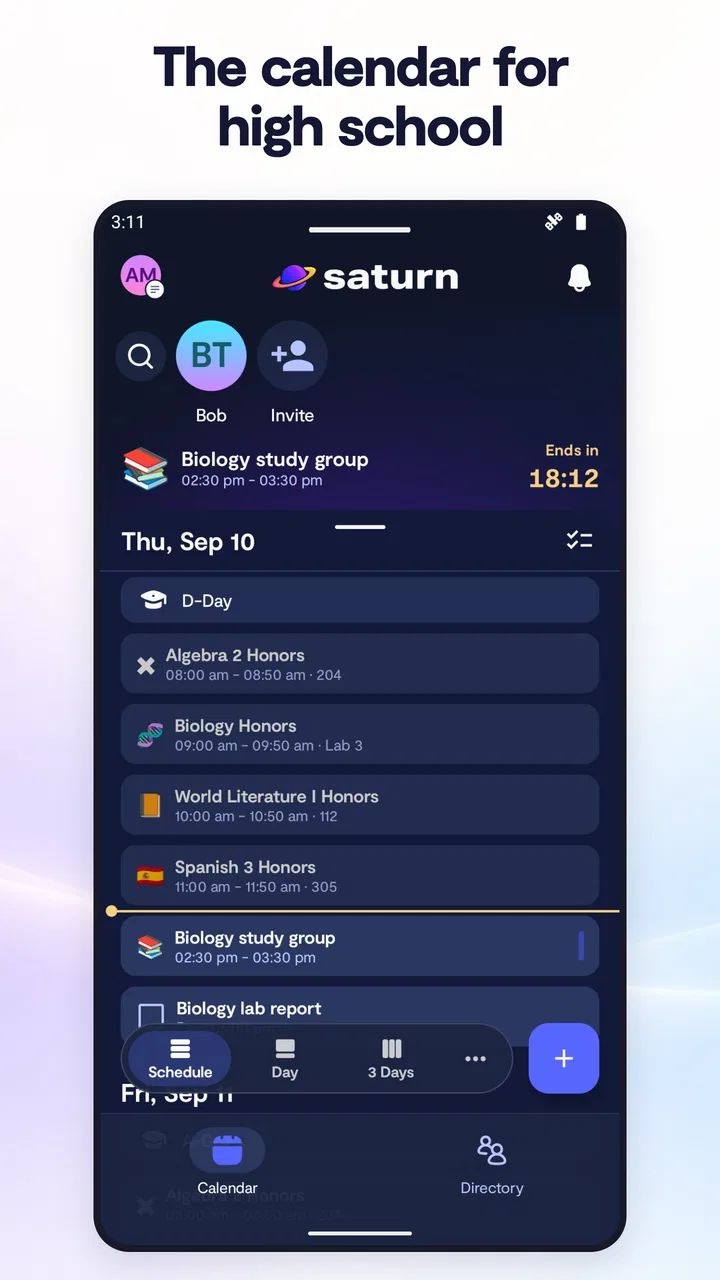
Saturn Calendar
- 4.3
- Rating
- 500.00K
- Installs
- Free
- Price

 Analysis by App-foxy
I approached Saturn Calendar as a practical decision rather than treating it as just another calendar download. It is a free productivity app from Saturn Technologies Inc., built around schedules, events, and friends. That combination matters: the app is aimed less at someone who only needs a private list of appointments and more at people whose plans depend on knowing what others are doing too.
My first impression was that its appeal comes from context. A normal calendar tells me what I have to do, while Saturn Calendar is designed to make the surrounding social and school-life picture easier to follow. That can be useful when a week contains changing classes, activities, meetups, and shared plans. It also means the app deserves a closer look before replacing a calendar that already works well for you.
How I would decide whether Saturn Calendar fits
The most important question is not whether the app can display events. Almost every calendar can do that. The better question is whether I want my schedule to feel connected to the people and routines around me. If the answer is yes, Saturn Calendar has a clear reason to exist. If I only need reminders for bills, appointments, travel, or work deadlines, a more traditional calendar may be simpler.
You May Also Like

 Blood Strike: 2.5 Anniversary
Blood Strike’s Loadouts Turn Every Drop Into a Tactical Gamble
A close look at Blood Strike’s custom loadouts: how fast access to signature weapons reshapes its battle royale rhythm, rewards preparation, and narrows the gap between fights.

 Pandora - Music & Podcasts
Pandora’s Music Is Easy to Start, but Harder to Recover
Pandora’s strength is its low-effort path from a seed to a station. Its weak spot is how much confidence it asks you to place in connection, setup, and quiet recovery.

 8 Ball Pool
 Is Built on Rivalries, Rematches, and Routine
A close look at the rivalries, rematches, shared routines, and unanswered safety questions that turn a quick pool match into a persistent mobile community.

 Samsung Music
’s Quiet Strength Is Playing What You Already Own
Its reach comes less from spectacle than from dependable access to a personal library. That simplicity is both the app’s strongest retention engine and its ceiling.

 AccuWeather: Weather Radar
AccuWeather Review: A Quick, Clear Forecast for Everyday Decisions
For everyday plans, the best forecast is the one you can understand quickly. AccuWeather makes rain timing, radar, and local conditions easy to act on, with a few trade-offs.

 Hill Climb Racing
Why Hill Climb Racing Still Turns Crashes Into One More Run
A tiny car, a bumpy hill and one more upgrade: Hill Climb Racing keeps resurfacing because its simple chaos makes every near-miss feel personal.
More From Our News Desk
View All News


I would also consider how much time I want to spend maintaining a schedule. A useful calendar depends on accurate information. If I regularly forget to update events, the social side becomes less valuable because friends may be looking at an outdated picture. The app works best when the schedule is treated as a living plan rather than a one-time setup.
Saturn Calendar is listed for Everyone, so its basic positioning is broad rather than restricted to a specialist audience. It runs on Android with a minimum operating system requirement of Android 10, which makes checking device compatibility an important first step for anyone using an older phone. The current version is 3.41.01.1586, so I would also keep the app updated when possible to avoid unnecessary compatibility friction.
Its public reception gives some useful context without settling the decision by itself. The app has an average rating of 4.3 from around 4.5 thousand ratings, with roughly 767 written reviews, and it has passed 500 thousand installs. I read those numbers as evidence of an established user base, not as a guarantee that every scheduling style will feel natural. Calendar apps are unusually personal: the right choice depends on how I organize time, not only on popularity.
What I would test during the first week
I would begin with a real week rather than filling the calendar with imaginary examples. I would add the recurring commitments that shape my days, then enter one or two flexible plans and check whether the layout helps me understand the difference between fixed obligations and social possibilities. This quickly reveals whether the app reduces mental effort or adds another place to keep updated.
One useful test is to check the calendar at three different moments: while planning the week, while making a last-minute arrangement, and at the end of a busy day. A calendar can look attractive during setup but become awkward when I need an answer quickly. Saturn Calendar’s value is strongest if it helps me move from “What am I doing?” to “When are my friends available?” without making the process feel like administrative work.
I would also test how I handle privacy and visibility in practice. Social scheduling is convenient only when I am comfortable with the amount of information I choose to share. I would avoid entering sensitive personal details into a shared event and use clear, neutral names for plans that other people may see. That is not a criticism of this particular app; it is a sensible habit for any connected calendar.
The everyday scenario where it makes sense
Imagine a student finishing a day of classes and trying to arrange a study session, a meal, and a short break with friends. With a conventional private calendar, that person may need to message several people, wait for replies, and manually compare times. Saturn Calendar’s focus on schedules, events, and friends is more naturally suited to this situation because the calendar is being used as a shared view of availability rather than only as a personal reminder book.
The same idea can help with recurring routines. A group that regularly meets after school or work can use a visible schedule as the starting point for planning instead of rebuilding the conversation every time. The benefit is not that the app removes coordination completely; people still need to agree on changes. The benefit is that the calendar can make the first question easier to answer.
There is a subtle trade-off here. A shared schedule can reduce messages, but it can also create pressure to keep every change perfectly current. If plans change often, I would treat the displayed calendar as a planning aid, not an unbreakable promise. That mindset prevents a missed update from becoming a larger social problem.
Where Saturn Calendar wins over ordinary calendar habits
The strongest reason I would recommend Saturn Calendar is its social orientation. Many calendar tools begin with an individual and add collaboration as an extra layer. This app presents friends as part of the central experience, which can make it feel more relevant for people who organize their week around classes, activities, and shared plans.
That focus changes how I think about an event. In a basic calendar, an event is often the final answer: a title, a time, and perhaps a reminder. In a social calendar, the event can become a prompt for coordination. I can ask who is free, compare plans, and decide whether a proposed time is realistic before committing. This is especially useful for informal arrangements that are too fluid for a formal work calendar.
Another advantage is the reduced need to translate between personal planning and social conversation. When a friend asks whether I am free, I normally switch between a calendar, messages, and memory. A product centered on schedules and friends has a better chance of keeping those pieces closer together. Even a small reduction in switching can make a busy week feel less fragmented.
I also like the possibility of using the app as a visual planning surface rather than a list of isolated reminders. Seeing the shape of a week can reveal problems that individual alerts do not: too many commitments in a row, no realistic travel or rest window, or a social plan placed directly beside something immovable. That kind of overview is more valuable than adding another notification.
Three practical habits that improve the experience
First, I would enter fixed commitments before flexible ones. Classes, work periods, appointments, and other non-negotiable blocks establish the boundaries of the week. Social plans can then be judged against reality instead of filling empty-looking spaces that were never genuinely available.
Second, I would use short, recognizable event names. A shared schedule is scanned quickly, often on a phone, so a title that identifies the activity and place is more useful than a long description. This also limits the amount of personal information exposed through a casual glance.
Third, I would review the next day before making new plans. This is a small but important workflow improvement: it catches back-to-back commitments and prevents me from accepting a social invitation based only on a blank-looking time slot. The calendar becomes a decision tool instead of a passive record.
A fourth habit is to separate tentative plans from confirmed ones in my own routine, using whatever event organization the app makes available. The distinction matters because social calendars can otherwise make a possibility look as definite as a class or appointment. Clear planning language helps friends understand what is firm and what may still change.
Why the free price matters, and what it does not solve
Saturn Calendar is free, which lowers the cost of trying it. I can evaluate the social workflow without first deciding whether it deserves a subscription or a one-time purchase. That is a meaningful advantage for students, families, and anyone who is curious but does not want another recurring expense.
Free does not automatically mean effortless. The real cost may be attention: entering events, keeping them current, and encouraging the people I plan with to use the same system. If my friends are not interested in maintaining shared schedules, the app’s central advantage can shrink quickly. In that case, I may still like the calendar view, but I would be using only part of its purpose.
I would also avoid choosing it solely because it is free. A familiar calendar that already contains years of appointments, reminders, and routines may be more valuable than a new app that requires rebuilding everything. The right comparison is not price against price; it is convenience gained against the effort of changing habits.
Where a different calendar may fit better
Saturn Calendar is not the obvious choice for every kind of planning. Someone managing a complex professional schedule may prefer an established work-oriented calendar with tools designed around meetings, deadlines, and formal collaboration. I would not move a carefully maintained business workflow just to gain a more social presentation.
It may also be a poor fit for a person who wants a completely private planning space. If the main purpose is tracking medication, personal appointments, financial deadlines, or quiet reflection, a social-first calendar can feel like more structure than necessary. A simple private calendar or task manager may provide a calmer experience.
Families with very different schedules should think about coordination needs before switching. If several people need detailed responsibilities, household tasks, and long-range planning, they may want a tool designed specifically for shared family logistics. Saturn Calendar’s strength is the connection between schedules, events, and friends; that does not automatically make it the best household command center.
There is also a difference between event planning and task management. A calendar answers when something happens, while a task app answers what still needs to be done. If I need checklists, project dependencies, or extensive notes, I would keep a dedicated task tool alongside the calendar rather than expecting one app to replace both.
For travel or highly detailed appointments, I would compare the amount of information I need to store with how quickly I need to see it. A social calendar can be excellent for deciding when to meet, but a specialized travel planner or work calendar may be better for documents, complicated itineraries, and formal reminders. The best setup may be a combination rather than a complete replacement.
The switching cost is more than installing an app
Moving to Saturn Calendar involves three kinds of effort. The first is mechanical: recreating or importing the events that matter. The second is behavioral: remembering to open this calendar instead of the one I have used for months. The third is social: helping friends understand where plans now live and what information should be kept current.
I would reduce that cost by running a short trial rather than deleting my old calendar immediately. I would keep important appointments in the existing system while using Saturn Calendar for a specific purpose, such as coordinating a group routine. After that trial, the decision becomes clearer: did the social view save time, or did it create duplicate work?
It is also wise to choose one calendar as the source of truth for each type of event. Duplicating every appointment everywhere can cause conflicting edits and missed updates. I would keep formal commitments in the system that already handles them well, then use Saturn Calendar where its friend-focused planning is genuinely useful. That selective approach preserves the app’s advantage without forcing an all-or-nothing migration.
Before inviting others into a shared routine, I would agree on a simple etiquette: who adds the event, who updates changes, and how tentative plans are marked. This is an overlooked part of digital coordination. Without a shared habit, even a well-designed calendar can become another place where people look for information that is no longer accurate.
Questions I would answer before committing
If you are wondering whether it replaces a standard calendar, my answer is: sometimes, but not automatically. It can replace one for a person whose main need is social scheduling and a clear view of shared plans. I would keep another calendar in the mix if I rely on detailed professional organization, extensive task lists, or a long history of personal reminders.
If you are asking whether friends must participate for it to be useful, the answer is also nuanced. The app can still help me organize my own schedule, but its distinctive value becomes more apparent when the people I regularly make plans with are willing to use the same space. Without that participation, it behaves more like a personal calendar with a social emphasis.
If you are concerned about age and device compatibility, the app is rated Everyone and requires Android 10 or later. I would check the operating system on an older phone before planning a full switch. That small check is more practical than discovering a compatibility problem after spending time rebuilding a schedule.
If you are deciding whether the free price is enough reason to try it, I would say yes for a low-risk experiment, but no as a complete decision rule. The trial costs little financially, yet the value depends on whether the app fits the way you and your friends actually coordinate. A free app that needs constant duplicate entry is not truly convenient.
Finally, if you are worried about changing plans, I would use it with realistic expectations. Calendar software cannot make people reply, arrive on time, or honor an agreement. Its job is to make timing and availability easier to understand. That is valuable, but it is different from solving communication itself.
My recommendation after weighing the trade-offs
I would recommend Saturn Calendar to students, young adults, and socially active users who want their schedules to connect more naturally with friends and shared events. The free price makes experimentation easy, the Everyone rating keeps its audience broad, and the established presence of over 500 thousand installs suggests that it is not an obscure one-off utility. More importantly, its focus gives it a clear identity instead of merely copying a conventional appointment list.
I would be more cautious about recommending it as the only calendar for professionals, privacy-focused planners, or people who need deep task and project management. Those users may be happier with a traditional calendar, a dedicated task manager, or a family planning tool. Saturn Calendar can still complement those products, but replacing a mature workflow should require a clear benefit.
My practical advice is to try it with one genuine social routine. Add the fixed parts of the week, include a few realistic events, and see whether planning with friends becomes faster or clearer. Pay attention to duplicate work, outdated information, and whether the calendar helps with decisions rather than simply displaying them.
In my view, Saturn Calendar is best when time is a shared experience. It is less compelling when a calendar is only a private filing cabinet for appointments. If your week is shaped by friends, recurring activities, and changing availability, I think it is worth trying. If your priority is formal scheduling or detailed personal organization, I would keep your usual alternative and use Saturn Calendar only if its social workflow proves genuinely useful.
That is the deciding point: not how many features a calendar appears to have, but whether it reduces the small coordination problems that fill an ordinary week. For the right user, this app can make those conversations easier to start and those plans easier to see. For everyone else, a simpler calendar may remain the better choice.
FAQs for Saturn Calendar
01What is Saturn Calendar and what can I use it for?
Saturn Calendar is a student-focused calendar and planning app designed to help users organize classes, assignments, events, exams, and other important commitments in one place. After setting up your school schedule, you can use it to check what is coming next, plan your day, and keep track of academic responsibilities. It is especially useful for students who want a clearer overview of their timetable and social or school activities.
02How do I set up my schedule in Saturn Calendar?
When you first open Saturn Calendar, you generally need to provide information about your school, classes, timetable, and possibly your grade or academic year. The setup process is intended to create a personalized calendar rather than a generic planner. You should review the imported or manually entered schedule carefully, because incorrect class times, periods, or school details can affect reminders and the accuracy of your daily agenda.
03Can I use Saturn Calendar to track assignments, exams, and events?
Yes, Saturn Calendar is designed to combine regular class schedules with academic and personal planning. Depending on the features available for your account and school, you may be able to add assignments, tests, events, reminders, and other deadlines. This makes the app more practical than a simple timetable, although users should still verify important deadlines with their school platform or teachers if the information is synchronized automatically.
04Is Saturn Calendar free to download and use?
Saturn Calendar can generally be downloaded without an upfront charge, but availability of specific features may depend on the current version, region, account type, or optional in-app purchases. Before downloading, it is worth checking the official store listing for subscription details, premium tools, and any limitations on calendar customization or school-related features. Pricing and included functionality can change over time.
05What privacy information should I consider before using Saturn Calendar?
Because Saturn Calendar may involve school information, schedules, assignments, contacts, or social features, privacy is an important consideration before creating an account. Read the app’s current privacy policy and review the permissions requested during installation. Avoid entering sensitive personal information unless it is necessary, and remember that sharing or connecting with other users can make parts of your schedule or profile visible depending on your settings.
Pros
- Clean
- minimalist interface makes dates and events easy to scan.
- Supports recurring events for routines
- classes
- and regular appointments.
- Useful reminders help reduce the chance of missing important events.
- Calendar views make it simple to review upcoming plans at a glance.
- Lightweight design feels responsive on most modern mobile devices.
Cons
- Advanced planning tools may be limited compared with larger calendar suites.
- Some features may require permissions that privacy-conscious users may question.
- Customization options for colors and layouts can feel somewhat basic.
- Users may need another app for task lists
- notes
- or project planning.
- Sync behavior can depend on the device and connected calendar service.

Saturn Calendar
Gallery